 |
RECOMENDED PROFILE SETTINGS (How to apply skill points) |
I
often have people ask my opinion on how to set up a new
profile, or more specifically how to assign the initial 15
skill points. The initial setup of a new profile can make
a tremendous
difference
in both your success in the
game and your level of enjoyment. The wrong initial skill points
will make game play tedious as well as making it nearly impossible
to turn your new profile into a Champion. I will show you how
I set up a new profile. I can tell you from experience that this
initial setup works very well. It is the ONLY way I will set
up a new profile and I know many, if not all, of the other =OTB=
members use it as well.
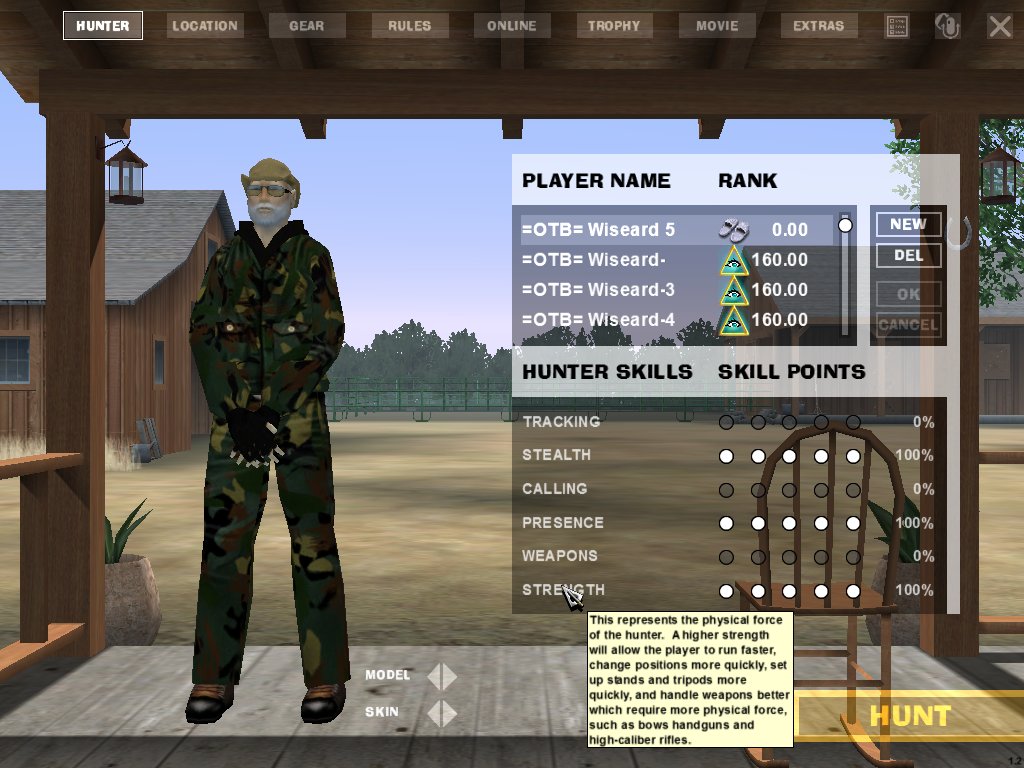
If you will try this setup I think you will find that it will also work very well for you. I am not going to go into great detail as to why I like it or why I think it works. You can find that out easily enough for yourself by setting one up and using it. <:-)> (<--That’s a Wiseard Grin) Basically you need to set up the profile with: 100% (5 skill points) on Stealth
Click on the picture below to see a full sized example of how the new profile should look.
FOLLOWING ARE
DETAILED INSTRUCTIONS ON SETTING UP THE RECOMENDED PROFILE: Click on the HUNTER button at the top of the DH2005 main screen. You should now have the Hunter setup and information window on the right hand part of the screen. To set up a new profile click on the “NEW” Button on the upper right of this window. You will now see a new player line highlighted under “Player Name”. Usually it is named “Player1”. Double click on the Player Name and then delete the default name (Player 1). Now type in the name that you wish to give the new profile and then press Enter. Next bring your mouse pointer down to the “Player Skills” area and point to the first empty circle to the right of “STEALTH”. Click 5 times (Left mouse button) or until all 5 circles on that line have turned white and it says 100% on the right end of the Stealth line. It is not necessary to move the mouse pointer, just keep clicking until they are all filled. If you make a mistake you can remove a white circle by clicking on it with the RIGHT mouse button. Next move down to the Presence line and repeat until you have 100% for Presence. Finally repeat one more time on the STRENGTH line so that you have 100% on that line as well. This will give you 100% on Stealth, Presence, and Strength. I know, your thinking what about Calling and Tracking and Weapons? All three can be helpful but none are as important as are Stealth, Presence and Strength and the 100% level in these three gives you skills that you will need. Hint: If you hold your mouse pointer over the skill name a drop down window will open giving you a basic idea of what each skill does for you. Oh, and you might want to change the profile's "Model" by clicking on the arrow next to "Model" and "Skin" at the bottom of the profile window.
|
 |
 |
 |
||
 |
 |
 |
| < |